EXCEL RECORDS
Free Online Excel Row Comparison: Match Records by a Stable Key
A stable identifier such as SKU keeps records aligned after sorting or insertion. When no complete unique identifier exists, Diff Master compares rows by position and warns about cascading changes.
DOWNLOADABLE CASE
Inventory reconciliation: stable SKU records and a position fallback sheet
Fictional, repository-owned files. No personal, customer, or production data.
CHANGES YOU CAN VERIFY
Start with the source files.
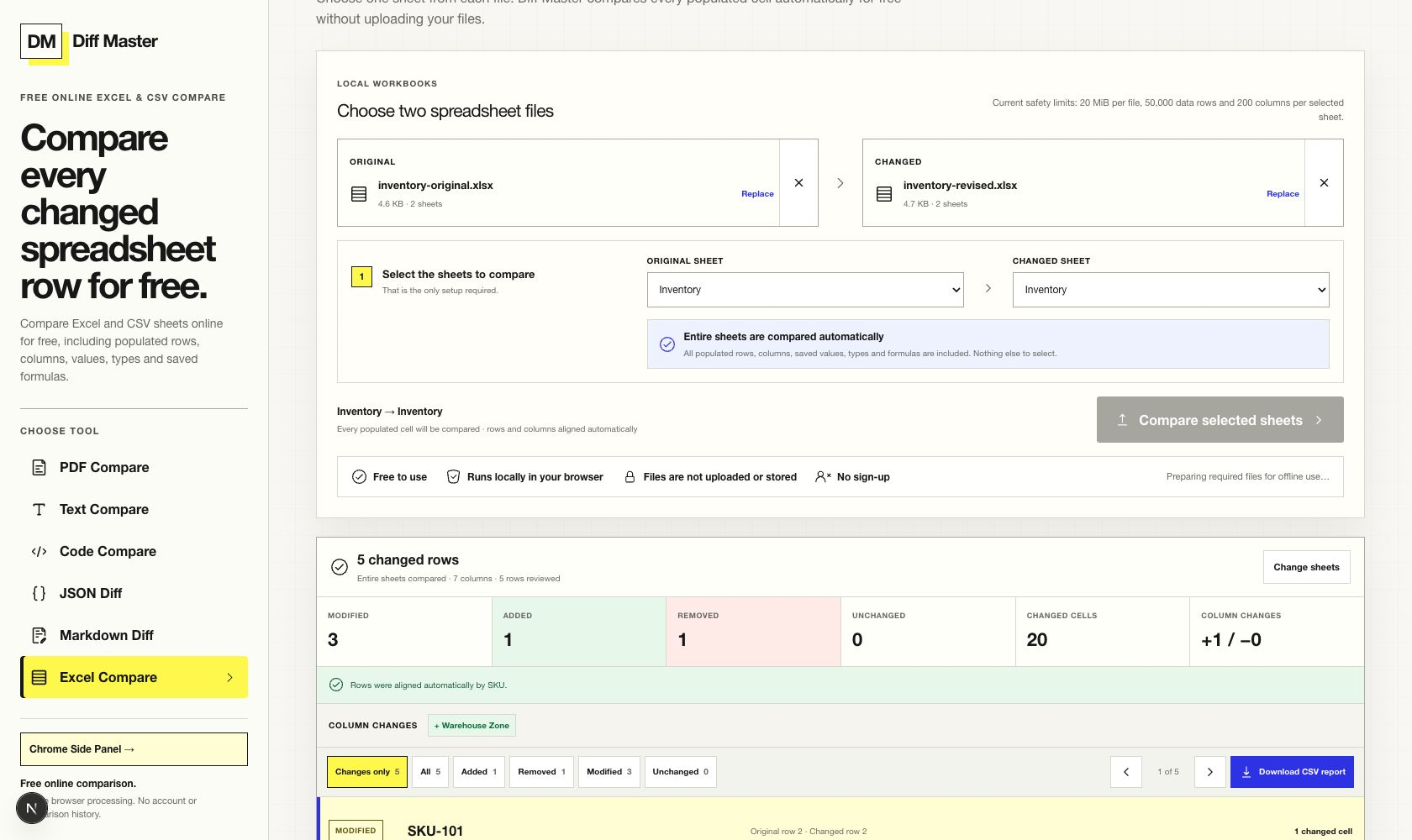
- SKU-104 stock changed from 18 to 11
- SKU-205 was removed and SKU-410 was added
- Unit Cost changed from numeric 12.50 to text “12.50”
- Reorder Value formula changed and a Warehouse Zone column was added
ACTUAL DIFF MASTER RESULT
Compare the evidence to the claim.
WHAT THE RESULT PROVES
A bounded conclusion.
- The Inventory sheet aligns records by the complete, unique SKU column.
- The result separates row, column, value, type, and saved formula changes.
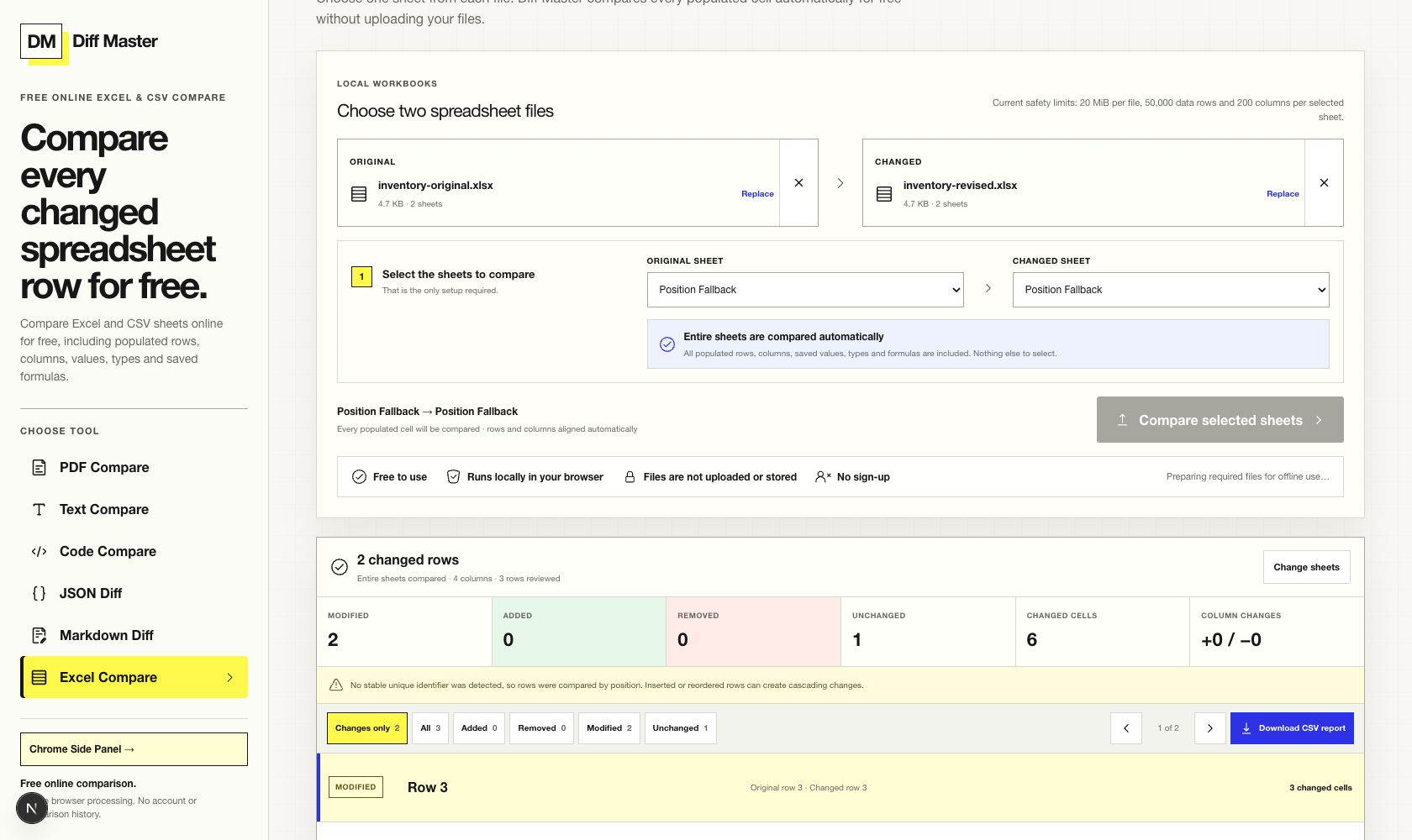
- The Position Fallback sheet contains no complete unique column, so the result explicitly uses row position.
Why row alignment changes the answer
A spreadsheet diff must decide which row on the left represents the same record on the right. A complete, unique identifier such as SKU lets the comparison follow a record even when another record is inserted or removed.
When no column is complete and unique on both sides, Diff Master falls back to row position. That is transparent but less resilient: one inserted row can make later positions appear different.
Read the stable-key inventory result
The Inventory sheets use fictional products and warehouse values. SKU is unique and populated for every record, so additions and removals do not turn the remaining rows into a cascade of positional changes.
| Evidence type | Example | What to verify |
|---|---|---|
| Value | SKU-104 On Hand: 18 → 11 | The same SKU remains aligned. |
| Row | SKU-205 removed; SKU-410 added | Distinct records are classified separately. |
| Type + formula | 12.50 number → “12.50” text; formula adds VALUE() | Displayed text alone would miss the type and logic change. |
| Column | Warehouse Zone added | The schema change is not mistaken for a row edit. |
Reproduce the position fallback
The same workbooks include a Position Fallback sheet. Every candidate column contains duplicate values, so there is no complete unique identifier. Compare that sheet pair and the result states that rows were aligned by position.
This warning is part of the evidence. It tells the reviewer that a changed or reordered row can affect later comparisons and that a stable identifier should be added before relying on the result for reconciliation.
TRY THE SAME FILES
Reproduce the result.
- Open Excel Compare, choose both inventory workbooks, and compare the Inventory sheets.
- Verify that SKU is reported as the stable identifier and inspect the added, removed, value, type, formula, and column changes.
- Select Position Fallback on both sides and compare again to see the explicit position-alignment warning.
LIMITS THAT MATTER
Do not extend the result beyond the tool.
- One worksheet pair is compared at a time.
- Without a stable identifier, inserted or reordered rows can create cascading position differences.
- Saved values, types, and formula strings are compared; formulas are not recalculated.
- Cell formatting is not compared.
RUN IT LOCALLY
Compare these workbooks
Reproduce the stable-key result, then switch sheets to inspect position fallback.