EXCEL FORMULAS
Free Online Excel Formula Comparison: Find Logic Changes Behind the Results
Formula comparison answers whether the saved calculation text changed, even when a displayed value looks plausible. Diff Master reads the formula string but does not recalculate it.
DOWNLOADABLE CASE
Quarterly budget review: three edits that change model logic
Fictional, repository-owned files. No personal, customer, or production data.
CHANGES YOU CAN VERIFY
Start with the source files.
- Net revenue now subtracts the discount column
- Forecast now references the downside growth assumption
- The review threshold changed from greater than $500 to at least $250
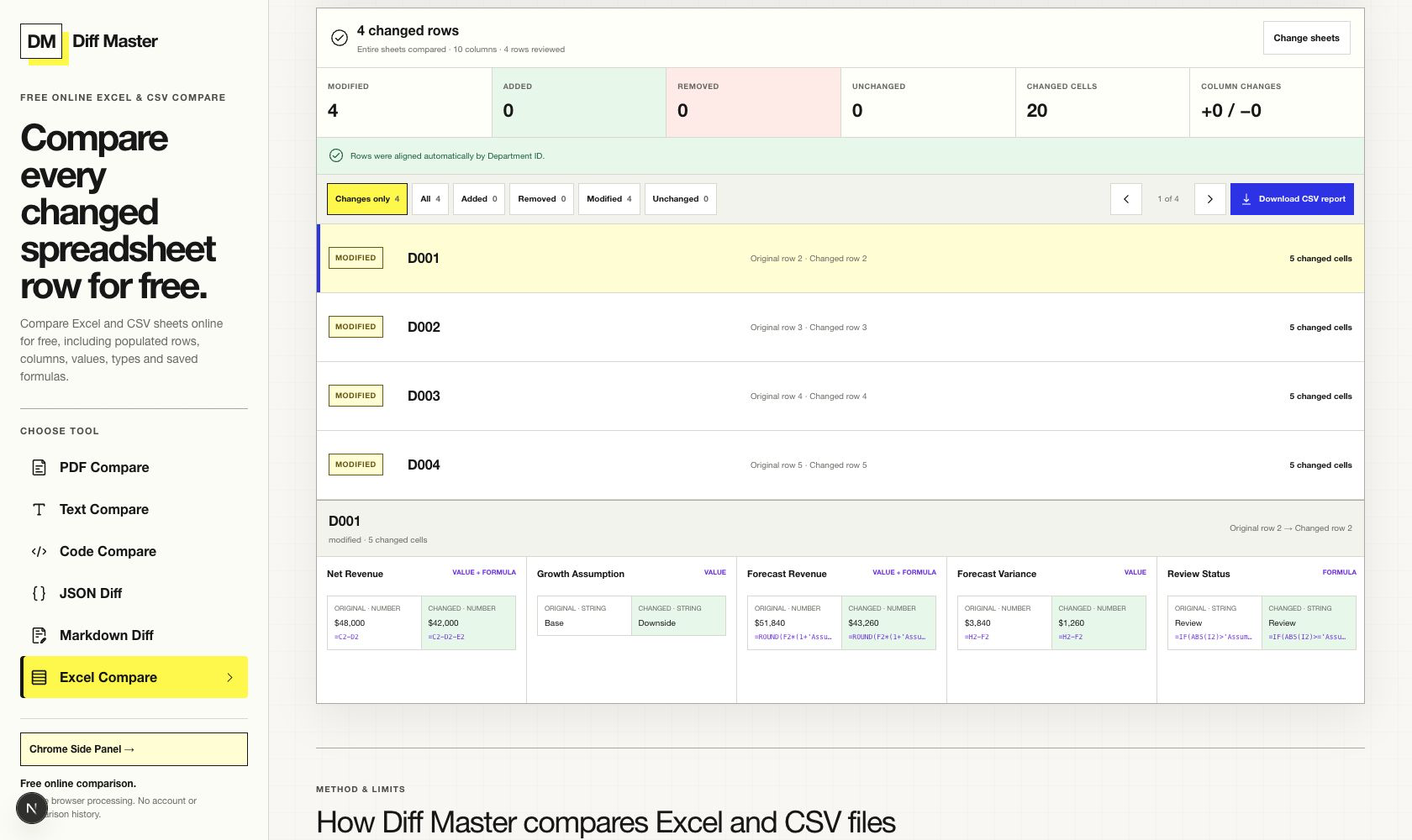
ACTUAL DIFF MASTER RESULT
Compare the evidence to the claim.
WHAT THE RESULT PROVES
A bounded conclusion.
- Department ID provides a stable row identifier for the Budget Review sheets.
- The formula strings change in each department row while the unchanged formulas remain available as context.
- Saved values and types are compared alongside formulas without executing workbook logic.
Why formula text is the evidence
A displayed number can look reasonable even when the saved calculation changed. Formula review asks a more precise question: did the expression stored in the workbook change between versions?
Diff Master reads both saved values and formula strings. It does not open Excel’s calculation engine, run macros, or refresh linked data, so the result stays a comparison rather than a model execution.
Three repeated logic changes
The fictional budget workbooks contain four department rows and a separate Assumptions sheet. The Budget Review sheet uses Department ID as a stable identifier. Each row repeats the same three deliberate formula edits.
| Column | Original pattern | Revised pattern | Meaning |
|---|---|---|---|
| Net Revenue | =Gross Revenue − Direct Costs | =Gross Revenue − Direct Costs − Discounts | Discounts now reduce net revenue. |
| Forecast Revenue | References Base Growth | References Downside Growth | The forecast uses the lower scenario. |
| Review Status | Variance > $500 | Variance ≥ $250 | More rows can enter review. |
Separate formula comparison from recalculation
The workbook contains cached results so the files remain readable in ordinary spreadsheet software. Diff Master reports what is saved; it does not claim that those cached values were freshly recalculated.
If a business decision depends on the computed output, recalculate in a trusted spreadsheet application after reviewing the formula change. Formula diff and model validation are complementary controls.
TRY THE SAME FILES
Reproduce the result.
- Open Excel Compare and choose the original and revised quarterly budget workbooks.
- Select Budget Review on both sides.
- Run the comparison, filter to changed cells, and inspect the formula text shown for Net Revenue, Forecast Revenue, and Review Status.
LIMITS THAT MATTER
Do not extend the result beyond the tool.
- Diff Master compares saved values, types, and formula strings; it does not recalculate formulas.
- Macros are not run, and external data is not refreshed.
- Cell formatting is not compared.
- One worksheet pair is compared at a time.
RUN IT LOCALLY
Compare these workbooks
Inspect the saved formula strings locally without executing workbook logic.