PDF VISUAL
Free Online Visual PDF Comparison: Catch Layout, Font, and Image Changes
A rendered-page comparison catches changes that extracted text cannot: typography, position, artwork, and page geometry.
DOWNLOADABLE CASE
Product brief: the words stay the same while the page changes
Fictional, repository-owned files. No personal, customer, or production data.
CHANGES YOU CAN VERIFY
Start with the source files.
- Title font, weight, and color changed
- Product artwork was replaced
- Specification panel moved and resized
ACTUAL DIFF MASTER RESULT
Compare the evidence to the claim.
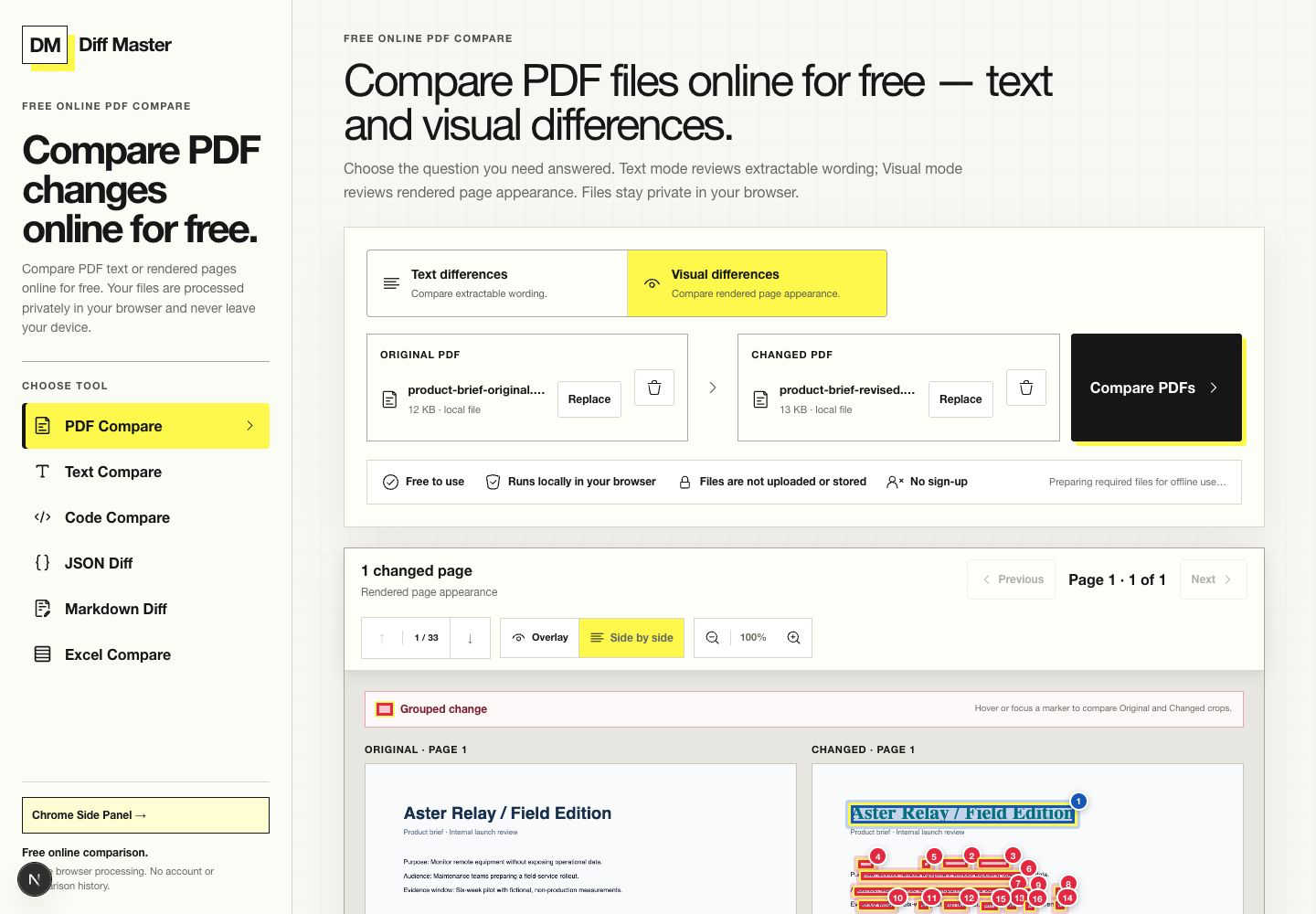
WHAT THE RESULT PROVES
A bounded conclusion.
- Both PDFs expose the same text in the same drawing order.
- The changed page is detected from rendered pixels, not from wording edits.
- The highlighted regions correspond to typography, artwork, and layout changes in the source files.
Why a text diff is not enough
The two product briefs contain the same extractable words. A text-only result therefore cannot answer whether the page still looks the same. Visual differences renders each corresponding page and compares the pixel output in this browser.
That makes the mode useful for preflight review, brand checks, and layout regressions. It remains evidence of rendered appearance—not proof that the files are legally, semantically, or print-color equivalent.
Three visual changes to inspect
The case uses a fictional product brief and repository-owned chart artwork. The original and revised files deliberately keep their words constant so the result isolates three visual decisions.
| Area | Original | Revised | Expected evidence |
|---|---|---|---|
| Title | Dark sans-serif | Green serif | Font shape, weight, size, and color pixels change. |
| Artwork | Light line chart | Dark bar illustration | A large image region changes. |
| Specification panel | Left, compact rectangle | Right, larger rounded panel | Position, size, and surrounding whitespace change. |
How to review visual evidence without overclaiming
Pixel comparison can surface antialiasing, font substitution, and rendering differences in addition to intentional design edits. Review the original and changed crops together and ask whether the marked region affects the decision at hand.
For wording assurance, run Text differences as a separate check. The two modes answer different questions and neither silently substitutes for the other.
TRY THE SAME FILES
Reproduce the result.
- Open PDF Compare and choose Visual differences.
- Choose the original product brief on the left and the revised brief on the right.
- Select Compare PDFs, open page 1, and inspect the marked regions against both rendered pages.
LIMITS THAT MATTER
Do not extend the result beyond the tool.
- No OCR. Visual mode compares appearance but does not convert scans into searchable wording.
- Pages align by page number.
- Visual comparison does not prove wording, semantic, legal, or print-color equivalence.
- Each PDF is limited to 50 MB and 150 pages.
RUN IT LOCALLY
Compare these PDFs
Run the same rendered-page comparison locally in your browser.